Kling 4.0 on Higgsfield: What's New, How to Use It and What It Costs
 By Alex, performance marketer · Updated · Published
Some links on this page are affiliate links. Learn more
Kling’s newest video model arrived on Higgsfield on October 21, 2026. It’s a big step up from Kling 3.0 for ad work: longer takes, more control over what happens in the shot, and the ability to fix a finished clip instead of regenerating it. Here’s what’s new, how to use it and what it costs, based on Higgsfield’s changelog and official blog.
What’s new in Kling 4.0
According to Kling, as summarized by Higgsfield:
- Steadier motion: more stable in fast scenes like fights, sports and character interaction, with stronger camera work.
- Up to 10 keyframes across the video, instead of first and last frame only.
- Up to 15 references: images (up to 10), videos (up to 5), a voice reference and Elements. Creative Recreation reuses the pace, composition and motion of an existing video.
- Video editing: swap a character, product, background, camera angle or style in a finished clip.
- Output: 3 to 30 seconds, 720p or 1080p, aspect ratios from 21:9 to 9:16, stereo sound and voiceover in 9 languages, including English, Spanish, Portuguese, German, French, Hindi, Japanese, Korean and Chinese.
- Long prompts: up to 8,000 tokens, so you can describe action and camera moves between keyframes in detail.
Kling 4.0 vs Kling 3.0
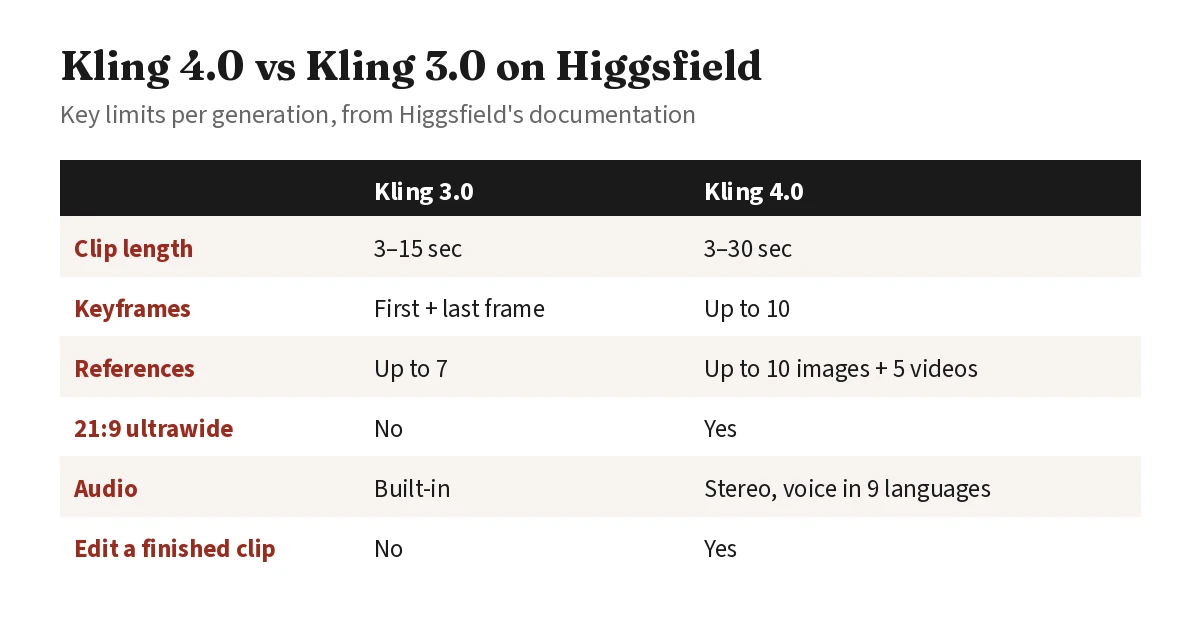 The biggest practical gains for ads: 30-second takes and editing a clip you already like.
Kling 3.0 is still a solid choice for 15-second social clips. Higgsfield’s Plus plan has included time-limited unlimited Kling 3.0, which makes it the cheaper option for quick tests. Pick Kling 4.0 when you need longer takes, precise beats via keyframes, or a fix to an existing clip.
How to use Kling 4.0 on Higgsfield
- Go to Video → Create Video.
- In Model, select Kling 4.0.
- Choose a mode: References, Frames or Edit video.
- Add inputs: reference images or videos; first, last or extra keyframes; or the clip you want to edit (up to 5 clips, 1 main, 30 seconds combined).
- Write the prompt step by step, including action and camera movement between keyframes.
- Set duration (3–30 seconds), resolution (720p or 1080p) and aspect ratio (Auto, 21:9, 16:9, 9:16 or 1:1).
- Check the credit cost on the Generate button, then generate.
Higgsfield’s tip: when a result is close, change one thing at a time (prompt, reference or duration) so you can see what made the difference.
How much Kling 4.0 costs on Higgsfield
Kling 4.0 runs on credits. Higgsfield’s published figures:
| Resolution | 5 seconds | 30 seconds |
|---|---|---|
| 720p | 25 credits | 150 credits |
| 1080p | 37.5 credits | 225 credits |
That works out to 5 credits per second at 720p and 7.5 at 1080p. Higgsfield also announced a limited-time launch discount from October 21, 2026; the exact price is always shown on the Generate button. For how many credits each plan includes, see our Higgsfield pricing guide.
Try Kling 4.0 on Higgsfield New users may get a personal discount of up to 50%, valid for 3 hours after signing up.
Kling 4.0 Flash: the cheaper version for tests
On November 4, 2026, Higgsfield added Kling 4.0 Flash, a lighter Kling 4.0 for quick tests and short videos. It has the same modes (References, Frames and Edit video) with fewer controls:
| Kling 4.0 Flash | Kling 4.0 | |
|---|---|---|
| Length | 3–20 seconds | 3–30 seconds |
| Resolution | 720p | 720p or 1080p |
| Frames | Start frame only (also sets aspect ratio) | Start, last and up to 10 keyframes |
| References | Up to 10 images, 5 videos, plus Elements | Up to 15, including up to 5 videos and Elements |
| Cost | Lower per generation | 25 credits per 5 s at 720p |
Higgsfield’s advice: use Flash to test ideas, then switch to Kling 4.0 for final versions with keyframes and 1080p. The exact Flash price appears on the Generate button (higgsfield.ai/ai/video?model=kling_4_0_flash).
Higgsfield or Kling directly?
Higgsfield gives you Kling 4.0 alongside Seedance, Nano Banana and its own tools on one credit balance. Going direct to Kling makes sense only if Kling is the one model you use. We compare the options in Higgsfield alternatives and Higgsfield vs Runway.
FAQ
Is Kling 4.0 available on Higgsfield?
Yes. Higgsfield added Kling 4.0 on October 21, 2026. Open Video, choose Kling 4.0 in the model menu and pick References, Frames or Edit video.
How long can Kling 4.0 videos be?
From 3 to 30 seconds per generation, double Kling 3.0's 15-second maximum.
How many credits does Kling 4.0 cost on Higgsfield?
Higgsfield lists 25 credits for 5 seconds at 720p, 150 for 30 seconds at 720p, 37.5 for 5 seconds at 1080p and 225 for 30 seconds at 1080p. The exact cost, including any launch discount, appears on the Generate button.
What's the difference between Kling 4.0 and Kling 3.0?
Kling 4.0 doubles clip length to 30 seconds, adds up to 10 keyframes instead of first and last frame only, accepts up to 10 images and 5 videos as references, adds 21:9 and stereo audio, and can edit finished clips.
What is Kling 4.0 Flash?
A lighter version of Kling 4.0, added to Higgsfield on November 4, 2026, for quick tests and short videos. It makes 3–20 second clips at 720p, costs less per generation than Kling 4.0 and supports a start frame only, no last frame or keyframes.
Can Kling 4.0 edit an existing video?
Yes. In Edit video mode you can swap a character, product, background, camera angle or style in a finished clip. You can add up to 5 clips (1 main), with a combined length of up to 30 seconds.
More on Higgsfield → Pricing, discounts, results and comparisons in one place.
Ran Meta user acquisition and creative testing for a mobile app. Every tool on this site is used hands-on before it gets a verdict.