Higgsfield Genjutsu: Motion Transfer, Object Swap and Genjutsu Lite
 By Alex, performance marketer · Updated · Published
Some links on this page are affiliate links. Learn more
Most AI video tools generate a clip from scratch. Higgsfield Genjutsu starts from a video you already have and changes only what you want: the product in someone’s hand, the location, the character or the whole visual style. On October 19, 2026, Higgsfield added Genjutsu Lite, a cheaper version for short clips. Here’s how both work, based on Higgsfield’s changelog and official Genjutsu page.
What Genjutsu does
Genjutsu has two modes:
- Motion transfer: takes the movement, camera and timing from any video and builds a new scene around it from your references.
- Object swap: changes only what you describe and leaves the rest of the frame untouched.
Prompts are optional. You can pick from 30+ presets or describe the change in a few words.
For ads, this means one strong source clip can become several variations: a different product, a different setting, a different character, the same proven motion.
Restyle: redraw a whole video
Added on September 30, 2026, Restyle works in Motion transfer mode and redraws the entire video in a new style while keeping the original motion, timing and camera work. Choose from 20+ animation styles or build a custom style from reference images. It accepts reference videos of 4 to 30 seconds and outputs 480p, 720p or 1080p. Restyle is available on the web and via MCP, but not in Genjutsu Lite.
Genjutsu vs Genjutsu Lite
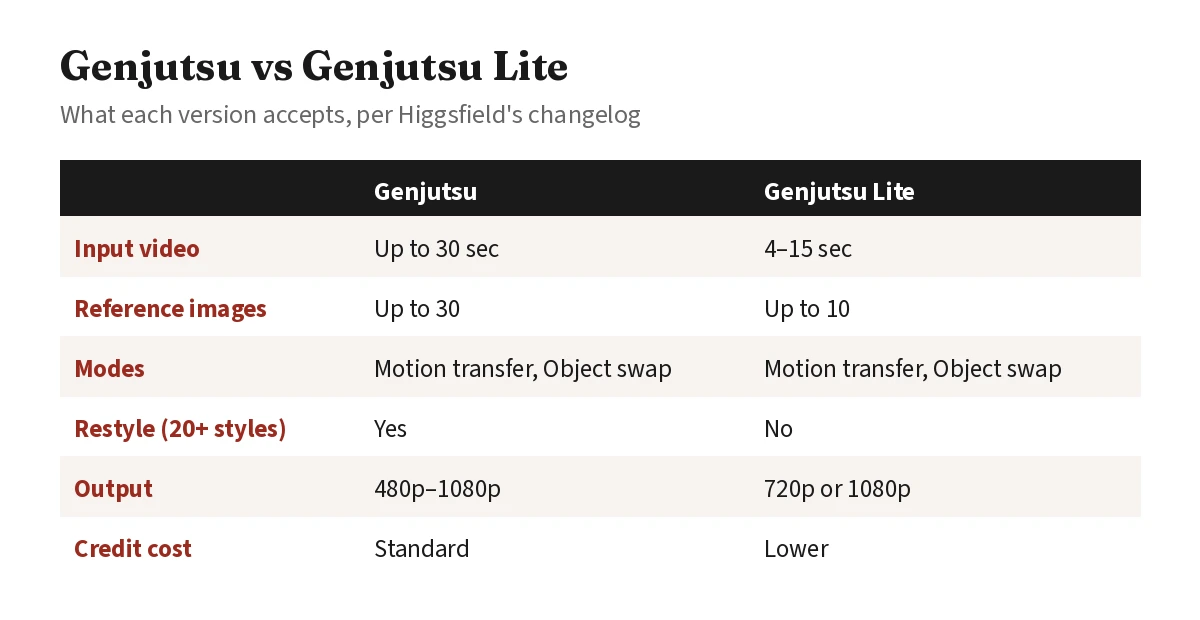 Lite keeps both core modes but is limited to short clips and fewer references.
Which to pick: use Lite for short trend clips and quick product swaps under 15 seconds. Switch to standard Genjutsu for longer videos, more than 10 references, or Restyle.
How to use Genjutsu Lite, step by step
- Go to Video and choose Higgsfield Genjutsu Lite in the model selector.
- Pick a mode: Motion transfer or Objects swap.
- Upload a video (4–15 seconds) and up to 10 reference images you own or have permission to use.
- Choose 720p or 1080p.
- Click Generate. The credit cost is shown before you confirm.
Standard Genjutsu works the same way: Video → model selector → Genjutsu.
How much Genjutsu costs
Genjutsu runs on Higgsfield credits, and each run shows its cost before you generate. Higgsfield’s own Genjutsu guide lists standard Genjutsu at 40 credits for a 15-second clip at 480p, 104 credits at 720p and 144 credits at 1080p, for both Motion transfer and Object swap. Lite costs about one-third as much on higgsfield.ai; Higgsfield doesn’t publish exact Lite figures, and costs can vary with settings. For plan prices and how many credits you get, see our Higgsfield pricing guide, and for the cheapest way to try it, Is Higgsfield free?
Try Genjutsu on Higgsfield New users may get a personal discount of up to 50%, valid for 3 hours after signing up.
Comparing video tools? See Higgsfield alternatives.
FAQ
What is Higgsfield Genjutsu?
A Higgsfield video tool, launched on August 31, 2026, that changes an object, location, product or character in a video and leaves everything else as it was.
What is the difference between Genjutsu and Genjutsu Lite?
Lite costs fewer credits and is meant for short clips: a 4–15 second video and up to 10 reference images, output at 720p or 1080p. Standard Genjutsu takes videos up to 30 seconds and up to 30 references, and it includes Restyle.
Do I need to write a prompt for Genjutsu?
No. You can pick from 30+ presets or briefly describe the change you want.
What is Genjutsu Restyle?
A Motion transfer option that redraws the whole video in a new visual style, keeping the original motion, timing and camera work. It offers 20+ animation styles or a custom style from reference images. It isn't available in Lite.
Can I use Genjutsu videos commercially?
Higgsfield says commercial use of generated outputs is allowed, subject to its Terms of Use.
More on Higgsfield → Pricing, discounts, results and comparisons in one place.
Ran Meta user acquisition and creative testing for a mobile app. Every tool on this site is used hands-on before it gets a verdict.