How to Cancel Your Higgsfield Subscription (and Get a Refund)
 By Alex, performance marketer · Updated · Published
Some links on this page are affiliate links. Learn more
Canceling Higgsfield takes a minute, but the button is a few menus deep, and canceling isn’t the same as getting your money back. Here’s the exact path, what happens to your credits, and when a refund is possible, based on Higgsfield’s help center.
How to cancel Higgsfield, step by step
- Log in to higgsfield.ai, click your avatar and choose Manage Account.
- Open Subscription and scroll down to Plan Settings.
- Open Manage Subscription, click Show, then Cancel Subscription.
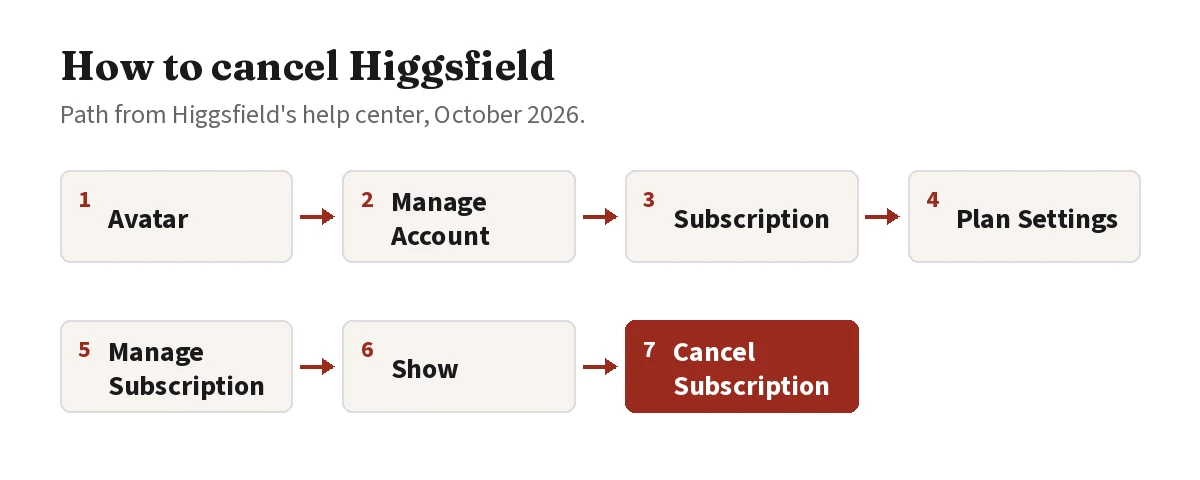
That turns off auto-renewal. No further charges are made, and Auto-Refill stops too.
Team, Scale or Enterprise plan? Only the workspace owner can cancel these, from the Organization settings.
What happens after you cancel
- Access: your plan stays active until the end of the period you’ve paid for. After that, your account moves to the free tier.
- Your work: canceling doesn’t delete your account or your generations. If an account stays inactive for a long time, older content may move to cold storage, but it isn’t deleted.
- Resubscribing: you can come back anytime from the pricing page.
What happens to your credits
| Credit type | After you cancel | After the paid period ends |
|---|---|---|
| Subscription credits | Still usable | Expire permanently |
| Credit Packs | Stay on your account | Usable on free-plan models until their 90-day validity ends |
| Auto-Refill credits | Stay on your account | Usable on free-plan models until their 90-day validity ends |
| Promo credits | Stay on your account | Usable only with an active subscription; expiry timer keeps running, they return if you reactivate before expiry |
| Boost credits | Stay on your account | Usable on free-plan models until their 90-day validity ends |
Tip: spend your subscription credits before the paid period ends. They don’t carry over.
Can you get a refund?
Canceling doesn’t refund anything automatically. A refund is possible only if all of these are true:
- you request it within 7 days of the purchase (or a longer window if your local law requires it);
- you haven’t used credits from that purchase. Free generations and unlimited-model generations don’t count;
- it’s an initial purchase, not a renewal. Renewals aren’t refundable.
Credit Packs and Auto-Refill charges can also be refunded within 7 days if none of their credits were used. Offers that unlock access or features aren’t refundable once access is granted.
How to request one: contact Higgsfield support with your account email, the purchase date, the amount and a short reason. Processing takes up to 3 business days, and a service fee of up to 6% may be deducted. An approved refund cancels the subscription immediately.
In the EU or UK? You have a 14-day right of withdrawal after purchase, but it ends once you start using the service. Requests go to [email protected].
Want to pay less instead of canceling?
If cost is the issue, you have cheaper options than leaving:
- Downgrade to Starter ($19/month). It takes effect at the end of your current period, and you keep access until then.
- Switch to yearly billing on Plus: $47/month instead of $59.
- Check the discounts that work today, including the partner-link offer for new accounts: Higgsfield promo code and discounts.
- See whether it pays off for ads: our review with real Meta campaign results.
- Compare alternatives before you commit elsewhere: Higgsfield alternatives · Higgsfield vs Runway.
Full plan breakdown: Higgsfield pricing.
FAQ
How do I cancel my Higgsfield subscription?
Click your avatar, open Manage Account → Subscription, scroll to Plan Settings, open Manage Subscription, select Show, then Cancel Subscription.
Does canceling Higgsfield take effect immediately?
No. Canceling turns off auto-renewal. Your plan stays active until the end of the current paid period, then your account moves to the free tier.
Can I get a refund from Higgsfield?
Only for an initial purchase, within 7 days, and only if you haven't used credits from it. Renewals aren't refundable, and a service fee of up to 6% may be deducted. EU and UK customers have a 14-day withdrawal right until they start using the service.
What happens to my credits when I cancel?
Subscription credits expire at the end of the paid period. Credit Packs, Auto-Refill and Boost credits stay on your account and can be used on free-plan models until they expire. Promo credits can only be used while you have an active subscription; their expiry timer keeps running after you cancel.
Will I lose my generations if I cancel?
No. Canceling doesn't delete your account or your generations. Deleting your account is a separate action.
More on Higgsfield → Pricing, discounts, results and comparisons in one place.
Ran Meta user acquisition and creative testing for a mobile app. Every tool on this site is used hands-on before it gets a verdict.